
Cybersecurity Awareness Month: Building Resilience, One Click at a Time
In October, Houston Methodist observed Cybersecurity Awareness Month with education, engagement and some friendly competition. This year’s theme, “Secure Our World,” emphasized the importance of simple, everyday actions that strengthen our collective digital defenses — especially in our health care environment where securing our patient data and systems is paramount.
“Cybersecurity is a shared responsibility,” said Ken Letkeman, HM senior vice president and chief information officer. “We’ve built a strong infrastructure, but it’s our people who make it resilient. The awareness and engagement we saw in October are exactly what we need to stay ahead of evolving threats.”
At Houston Methodist, we’re continuously enhancing our tools and infrastructure to detect and eliminate cybersecurity risks. Plus, we’re empowering you to make a difference by reporting, not ignoring, suspicious messages.
“Cybersecurity is no longer just an IT issue — it’s a patient safety issue,” said John Mowery, HM vice president and chief information security officer. “Every employee plays a role in protecting our patients and systems. Cybersecurity month was about empowering everyone to recognize threats and respond appropriately. But that must persist throughout the year.”
From Awareness to Action: Reeling in the Phish
During October’s “Catch a Phish” tournament, we sent 10 simulated phishing messages to test your awareness. Everyone who reported a phishing email was entered into weekly drawings for an HM-branded backpack. Of the nearly 500,000 emails sent, 84,268 (17.4%) people reported the phish.
Congratulations to the following tournament winners who demonstrated exceptional awareness and quick action:
- Miriam Gibson, HMCL
- Dustin Brett, HMCY
- Rosy Dilwortth, HMCY
- Maliheh Younsei, HMH
- Marisela Soto, HMSL
- Ha Mo, HMTW
- Francisco Patino, HMTW
- Sandra Lopez, HMW
- Alvin Shiu, HMWB
- Jasmine Kizzee, Kirby ECC
Phishing Red Flags: What to Watch For
Unfortunately, we still have some work to do when it comes to spotting a phish – 8,227 recipients clicked a link, risking exposure to cybercriminal activity and potential harm to HM. Let’s examine the phishing attempts and see how we did.
Phishing attacks are becoming more sophisticated, often using AI-generated content and deepfake techniques. Some of the more convincing simulated phish this year included messages regarding FedEx, Zoom and Microsoft Teams. For results from all the phish attacks, see the examples below.
Cyber Smarts: Report Suspicious Messages
Cybersecurity isn’t just about avoiding bad links. Ignoring a suspicious message is better than opening and clicking a link, but reporting it to IT is even better. If a message looks strange, click the Report Phish button or the Report Suspicious button. Reporting these messages allows our IT tools to investigate the threat and if real, remove it from everyone else’s inbox, too. Remember, it’s better to be safe than sorry. So, don’t ignore or delete suspicious emails or texts, report them.
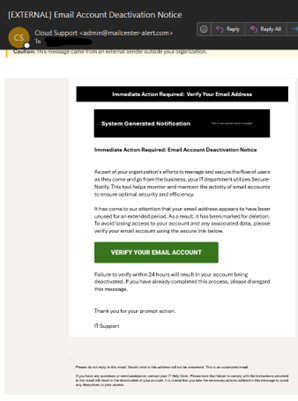
Phishing Campaign #1:
Email Account Deactivation Notice | Oct. 3
Clicked it: 536 employees (1%)
Reported it: 9,549 employees (20%)
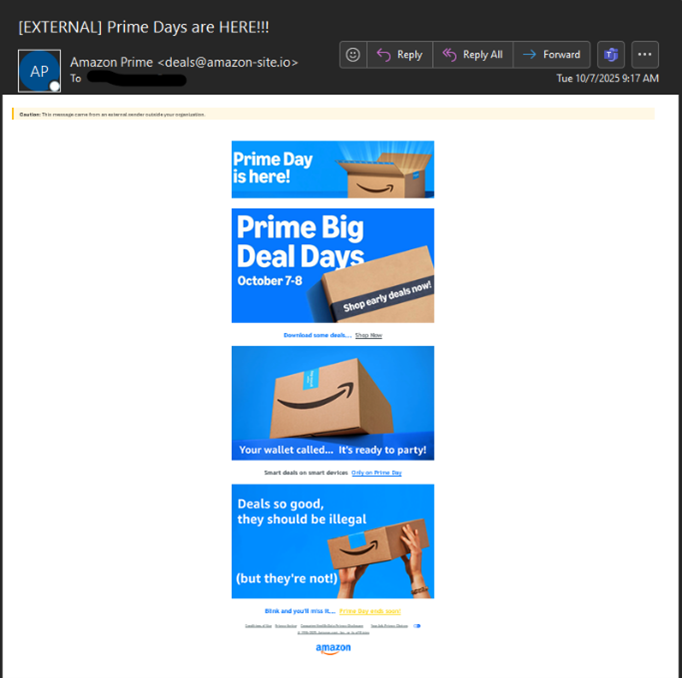
Phishing Campaign #2:
Amazon Prime Days | Oct. 7
Clicked it: 227 employees (less than 1%)
Reported it: 4,815 employees (10%)
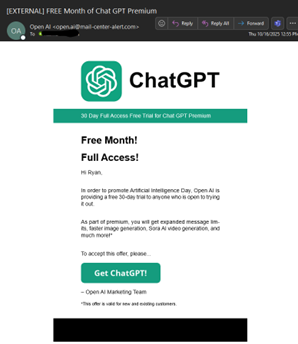
Phishing Campaign #3:
FREE Month of Chat GPT Premium| Oct. 16
Clicked it: 179 employees (less than 1%)
Reported it: 5,431 employees (11%)
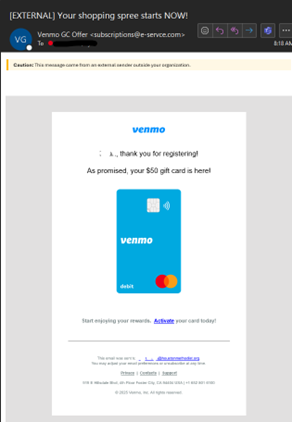
Phishing Campaign #4:
Your shopping spree starts NOW! (Venmo)| Oct. 17
Clicked it: 559 employees (1%)
Reported it: 10,328 employees (21%)
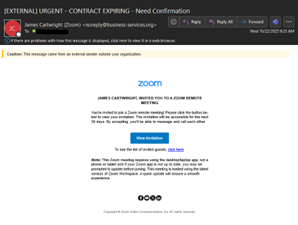
Phishing Campaign #5:
Urgent Contract Expiring (Zoom) | Oct. 22
Clicked it: 765 employes (2%)
Reported it: 10,429 employees (22%)
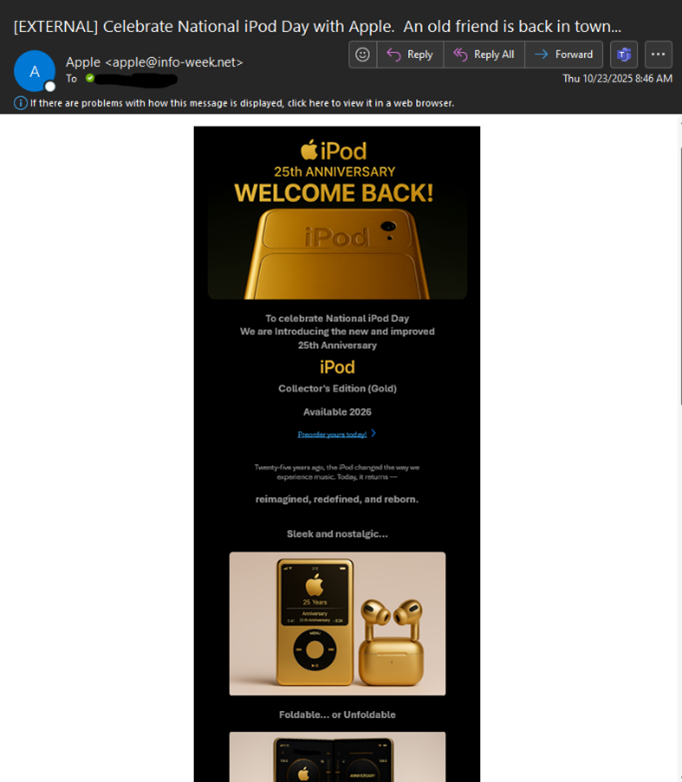
Phishing Campaign #6:
Celebrate National iPod Day with Apple| Oct. 23
Clicked it: 193 employees (less than 1%)
Reported it: 6,476 employees (13%)
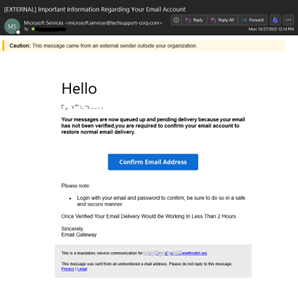
Phishing Campaign #7:
Important Information Regarding Your Email Account | Oct. 27
Clicked it: 691 employees (1%)
Reported it: 10,222 employees (21%)
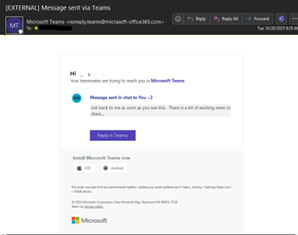
Phishing Campaign #8:
Message sent via Teams| Oct. 28
Clicked it: 3,057 employees (6%)
Reported it: 7,370 employees (15%)
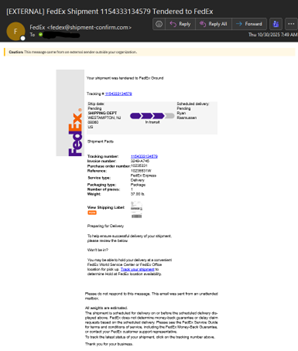
Phishing Campaign #9:
FedEx Shipment 1154333134579 Tendered to FedEx| Oct. 30
Clicked it: 1, 859 employees (4%)
Reported it: 11,859 employees (24%)
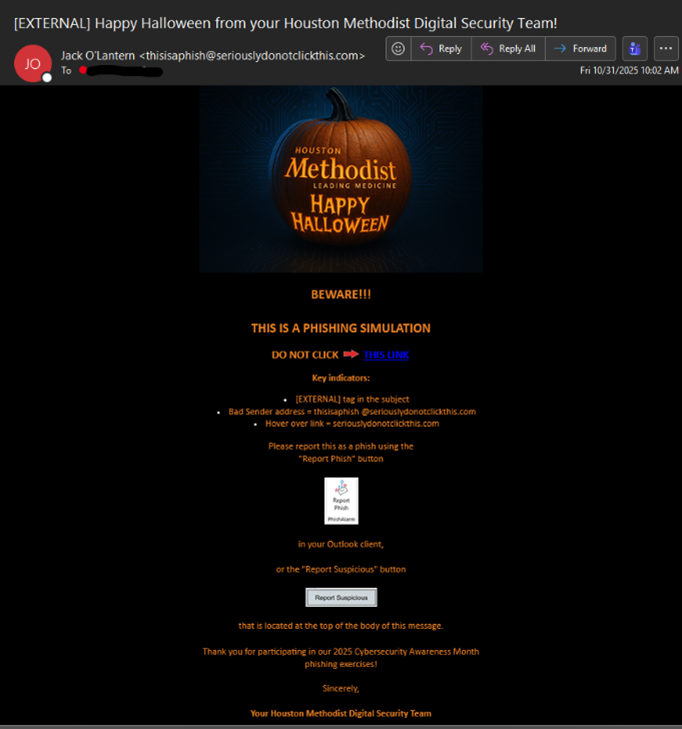
Phishing Campaign #10:
Happy Halloween from your Houston Methodist Digital Security Team | Oct. 31
Clicked it: 161 employees (less than 1%)
Reported it: 7,621 employees (16%)
If you were tricked by any of the phish, here are some common red flags to keep in mind:
- Is the message from an External sender?
- Does the message include urgent or alarming language (“Your account will be locked!”)?
- Are there unusual sender addresses or misspelled domains?
- Are there suspicious attachments, links or strange requests?
- Does the message request sensitive information (passwords, financial data)?
- Is the offer too good to be true?
- Does the message have poor spelling, grammar or generic greetings (“Dear user” instead of your name)?
Don’t Ignore It — Report Suspicious Messages
Remember, if anything about a message feels off, don’t ignore it — report it. Click the Report Phish button or the Report Suspicious button in Outlook for any suspected phish. This helps us to assess, analyze and quickly respond to threats against HM.
If the message isn’t a phish, you’ll be notified that it’s safe, and it will be returned to your inbox. If it’s a phish, IT systems will remove it from other HM inboxes, helping to reduce the threat.
As a reminder, the IT Service Desk will never contact you for your password or ask you to visit any websites to click on links or download information. If someone calls you requesting information, contact the Service Desk immediately at 832.667.5600 or email it-securityservicesteam@houstonmethodist.org.
Holiday Cybersecurity Tips: Stay Safe at Work and at Home
With the holidays in full-gear, it’s important that you be on high alert both professionally and personally. “Cyber threats don’t take holidays,” continued Letkeman “We must continue to learn, adapt and stay vigilant.”
Here are a few personal cybersecurity tips to keep you and your loved ones safe:
- Shop smart: Use trusted websites and avoid clicking on ads or links in unsolicited emails.
- Watch your Wi-Fi: Avoid using public Wi-Fi for financial transactions. Use a VPN if needed.
- Update your devices: Make sure your phone, laptop and apps are running the latest versions.
- Beware of fake charities: Verify donation sites before giving.
Cybersecurity Awareness Month is a powerful reminder that our vigilance must extend to every single day. Staying alert, aware and safe isn’t just a best practice, it’s a responsibility. Together, we can protect HM’s patient data and systems, ensuring our care remains uninterrupted and secure. By doing so, we keep our patients at the center of everything we do.